The idea of consuming various kinds of media to learn languages is not new. After all, classroom lessons are generally insufficient in teaching us about how a language is used in the real world, particularly in more colloquial speech. While they do provide a physical platform to practice, and understand grammatical patterns and usage, in many cases, such learning methods would need to be combined with other methods to enhance the learning process, such as familiarising oneself with words that are beyond the scope of classroom lessons. And the most well-known example of this? That would be learning with media.
Among the most accessible ways of learning with media, include books or literature, and watching television series or videos, with the latter being dominated by streaming services and video hosting sites today. Books, literature, and news can give learners a better insight into literary expressions and language usage in the context of narratives and expositions, but pretty much fall short when it comes to representing the colloquial form. Television series and videos, on the other hand, give us more focus on the colloquial language and pronunciations, while coming short in the literary front.
To complement these shows and videos communicated in the learner’s target language, one would use subtitles. These subtitles may be displayed in a supported language of choice, if there is one to begin with. From these, learners could pick out new words, and add them to their word bank to practice with. Usually, this follows a process from televised series or video to word banks and flashcards, before ultimately ending up in the learner’s memory.
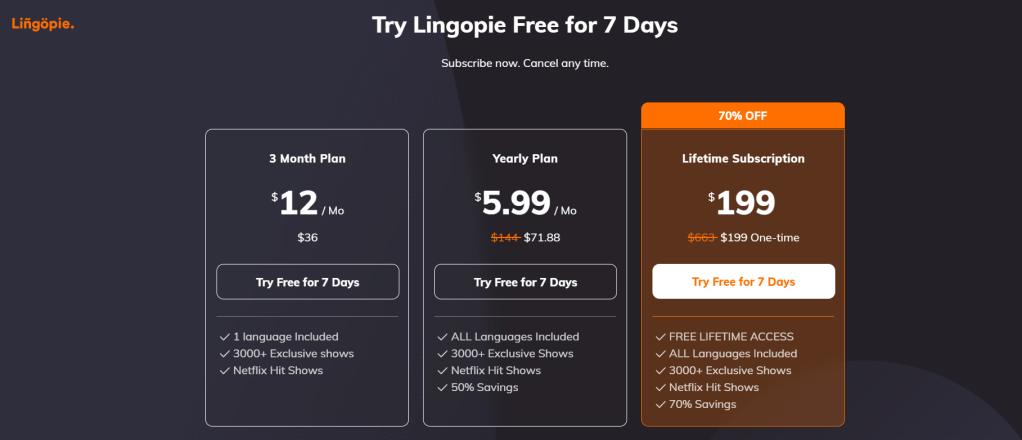
Today, we will be taking a look into an application called Lingopie, which serves to streamline this process of learning with visual and audio media. Amongst its unique selling points, is its support for bilingual subtitles from which the learner could pick out words or phrases to learn. However, unlike many of the language learning applications I have reviewed before, Lingopie is not free. Instead, there is a 7-day free trial for you to try out their core features, and for you to see if it is worth paying for continued access to Lingopie there on out. And so, I want to share my experiences with using Lingopie’s free trial, and letting you come to your own conclusions on whether or not Lingopie is worth paying extra alongside your Netflix subscription.
Core features
One of the main key selling points of Lingopie is the ability to toggle bilingual subtitles when viewing televised series, shows, videos, and even songs. With Lingopie, you could also use their browser extension to apply these subtitles to Netflix series, and learn new words while watching those shows. However, I do not have a Netflix account, nor do I even use Netflix at all. So as much as I want to watch Alice in Borderland with Lingopie’s extension for my review, I am unable to attest for the accuracy and completeness of Lingopie’s Netflix extension, and I can only provide my honest opinion regarding Lingopie’s core features in my review.
From the subtitles, you could select words to add to your word bank, which will also appear in some word-based activities at the end of the episode, or whenever you choose to practice these words. The main site does not really tell us how Lingopie works in practicing words, but from repeated rounds of practice I did during my trial, it seems that a spaced repetition method is used in familiarising newly encountered words. However, mastery of a certain word is ultimately judged by the user.

There is also a ‘grammar coach’ available from the interface, which covers the grammatical concepts behind a certain highlighted line. It does not seem to allow selection of multiple lines, so there is that point to take particular note of, especially when you are dealing with complex sentences with a potentially different word order from what you are normally used to. Bringing it up would show you the translations of the various elements in the selected line, and a brief explanation of how these words tie together in a sentence.

With these words that you have newly picked up while watching a certain video or episode, there are a couple of things you can do. The most classic one of all is turning them into flashcards. It is pretty much the typical flashcard that features a word or a phrase in the target language on one face, and the translation in the user’s language on the other face. There are also options to sort these cards by whether the user got them correctly as well, an ubiquitous feature across digital flashcard applications. But with a little twist.
With the word or phrase, there is also the sentence in which the word or phrase is first encountered. Writing this after the fact, I cannot recall if playback of that segment was a feature of those flashcards as well, but the pronunciations of these items in the target language were available at least.
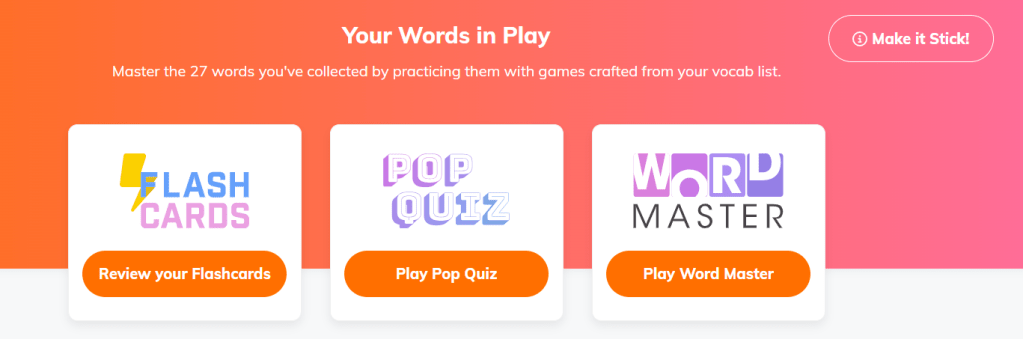
The first of the two actual activities is Pop Quiz. This is the activity where a prompt is given in the target language featuring the word or phrase picked up by the user, and the user is supposed to pick out the correct translation out of the four possible options. Like the flashcards, the context in which the word or phrase was acquired is provided, together with the pronunciation. But this time, I can say that there is video playback of that context as well, as I have used the two activities quite thoroughly during my trial.
The second activity of which is Word Master, which features a word matching exercise. Here, a single round would present the user with three words or phrases in the target language, and their corresponding translations. The user is supposed to match these correctly. Similarly, the context and pronunciation are presented, as with the video playback of that segment. Either of these two activities may occur while the video is playing, interrupting the watching experience, or at the end of the video.
The good
Even without a Netflix subscription, I was still presented with a decent variety of shows, videos, and interestingly, music, in the various languages I selected. The video medium covered a decent number of genres, from documentaries and instructional videos, to dramas and comedies. This variety aimed to encompass different registers of speech and contexts, since more expository media would entail a different usage of formality (and at higher levels, we would talk about discourse and coherence of the overall presentation) compared to a drama where one would expect more colloquial expressions. Including music under Lingopie’s coverage is a rather interesting move, as lyrics may present a more poetic expression than one could expect in a spoken video, or perhaps metaphors or allegories that could potentially be lost in translation if one is not careful enough. From a method meant to acquire new words and expand the user’s word bank though, I think this diversity is quite decent.
With this diversity of shows, comes a diversity of learner levels videos may be catered to. Absolute beginners may be recommended something that is more child-oriented, or animated, as users are usually presented simpler vocabulary from these videos. Some videos may be rated intermediate or advanced, as more niche vocabulary may be covered in particular videos, such as scientific documentaries. These proficiency ratings are usually given to the videos in Lingopie library, giving users an idea of where they could start with based on their level of proficiency.
From the subtitles, learned verbs or other conjugated words often feature the infinitive or the base word, which is helpful when a new word is encountered for the first time. This applies most appropriately to the verb class in languages like Spanish and German, where verbs are conjugated to agree with number, person, tense, and mood. In speech, one is more likely to encounter conjugated forms of the verb, such as participles, and so providing the infinitive form (or the base form) of the verb in question is great to introduce the user to that particular verb. In German, there are verbs that could be separated into two elements, the trennbares Verb, such as (anrufen, separable into conjugated elements like ruft an). These are also provided with the base form in Lingopie, which is a welcome feature. Perhaps one improvement from this is to practice based on the infinitive rather than the raw conjugated form one encountered in a video, but that could spoil other functions when practicing words in the activities mentioned earlier.
For languages involving non-Latin characters, you can actually toggle between writing systems displayed to suit your familiarity with the writing system used by your target language. Take note that you cannot toggle between Traditional and Simplified Chinese subtitles, as the latter is the only system used in Lingopie’s Mandarin Chinese selection. So it definitely felt jarring to see Simplified Chinese subtitles in a Taiwanese series.
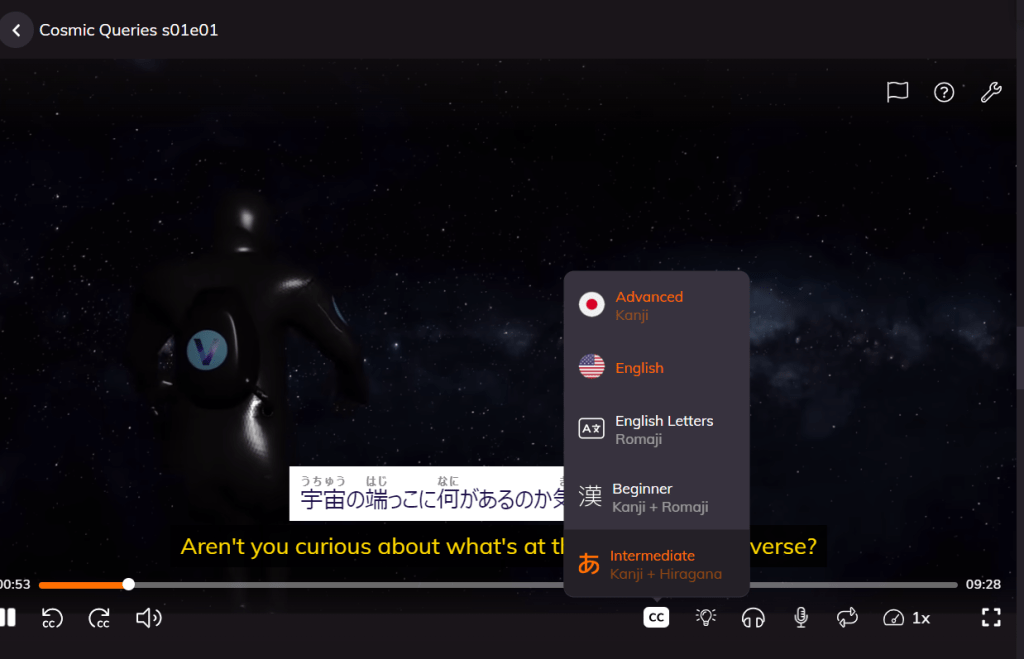
But for Japanese learners, you can select which combination of subtitles you want, especially when it comes to learning kanji. So if you are a beginner, you might want to do rōmaji subtitles if starting from absolute zero, and throw in kanji and rōmaji to get used to seeing Japanese subtitles, before moving onto kanji with hiragana transcriptions to pick up more kanji. And for a challenge, you could also opt to turn off transcriptions for kanji, and see how many you can correctly identify.
The not-as-good
I would like to direct some criticism of Lingopie towards the Asian languages covered by Lingopie, such as Chinese (of which I am a native speaker). The main languages in question are Chinese, Japanese and Korean, the former two are known to not feature spacing between individual words. Comparing these subtitles and functions against languages that do use this word spacing like German, I generally find that the quality, accuracy, and completeness of the subtitles in languages like Chinese are not really on par with those of languages like French. The subsequent points are some of the more important downsides I want to address, which I think would impact how effective a user may learn these three languages from Lingopie.
To start off, let us cover the identification of words and phrases. In languages like German, for example, it could rather accurately identify certain phrases used in colloquial speech, such as Pech gehabt (Unlucky, bad luck!), and gives the translation as a phrase. However, in languages that do not use spaces, like Japanese, this identification becomes more of a problem. This occurs especially when words have particles attached to them, such as the subject marker が ga. Take this one for example:
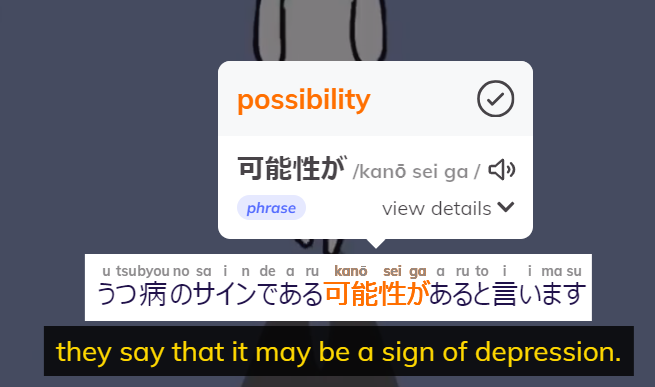
Here, the word that would translate to ‘possibility’ was misidentified as a phrase, because Lingopie groups the actual word, kanousei 可能性 with the subject marker ga が. And as you can see from the transcription of the Japanese subtitles, there are cases when Lingopie just treats each character individually, while grouping others together, creating a somewhat inconsistent mess. The first word, うつ病 (depression), should have been grouped together to better identify as a single word, utsubyou, rather than two (u tsubyou). Comparing these amongst languages, I find that this problem is most prevalent in the Japanese selection.
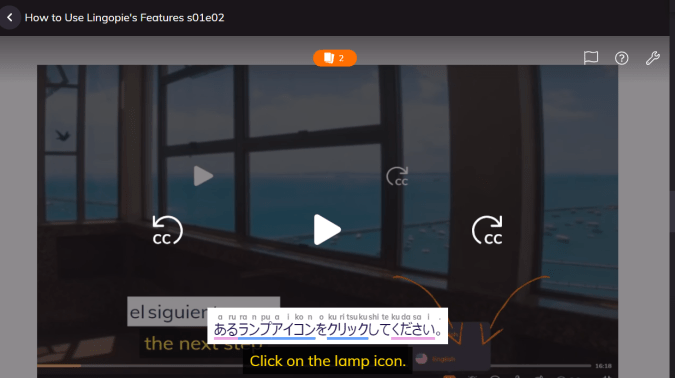
A more accurate distinction between words and phrases could be seen in the above screenshot, as it correctly identifies ランプアイコン (lamp icon) as a single coherent word, rather than attaching it together with the object marker を o. Yet, the verb ‘to click’ seems to be just captured as the noun ‘click’ クリック rather than クリックする or at least クリックして, presenting another case of this inconsistency. Japanese has a system of compound verbs, which would present a problem in the identification of individual verbs or the overall verb in Lingopie, and it is something I would encourage Lingopie users for Japanese language videos to take particular note.

In the Mandarin Chinese section, there are Taiwanese shows and series as well as those from Mainland China, the former also includes parts where characters converse in Taiwanese Hokkien. Subtitles may not entirely capture what is said in Taiwanese Hokkien, nor is this difference particularly noted, not even in the Grammar Coach. The hanyu pinyin only reflects the Mandarin Chinese translation of Hokkien speech, so there is that to take note of.

Additionally, colloquial Taiwanese Mandarin speech often features particles such as 啦 la and 耶 ye. In this screenshot, what was actually said was “就是儅醫師耶“. I think it could be helpful if the subtitles captured these particles, and are covered by the Grammar Coach, as these colloquial particles can often reflect nuances one would encounter in everyday speech, which might be quite untranslatable at times. The film Bad Weak Chicken is a great example of the usage of colloquial Taiwanese Mandarin speech, which is worth checking out. Similar sentence-final markers in the Putonghua counterpart include 呗 bei, which could also have been omitted by Lingopie’s subtitles.
Lastly, there is something I would want to bring up regarding the Grammar Coach. As I explored its use and functions, there are occasions where certain key elements of a line or a sentence are entirely missed, which might hamper learning with Lingopie. Take the following line for example, which translates to “And if you are adventurous,”:
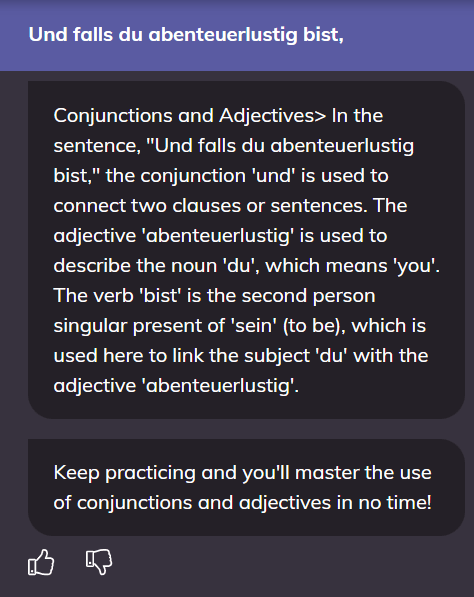
Did you spot the missing element left out by the Grammar Coach?
That’s right, the word falls (if) was left out by the Grammar Coach. Being a key grammatical component of the clause, one would expect the Grammar Coach to cover its use, and how it could affect the structure of the clause. For one, it is used in conditional sentences, as you may be familiar with even in programming conditionals. The more important bit is how the use of the word falls would send the verb in the clause all the way to the back, hence the appearance of the word bist ([you] are) at the end of the clause. Thus, it certainly felt like a missed opportunity for the Grammar Coach, which should have covered such key elements in a clause, despite it covering the use of the conjunction und (and).
What I hope to see
Currently, words learned can be sorted by familiarity, parts of speech, and other grammatical categories. Things like “Abenteuer” (adventure) and “Strahlung” (radiation) would be sorted together as nouns, if sorted by parts of speech. Personally, I would want to be able to sort these words into certain vocabulary themes, such as scientific terms from words I have picked up from a series called All about Radiation, or group colloquial phrases together into one word pool. Being able to sort these words into these categories would help in focusing practice on a certain theme.
Other features I would like to see is turning segments in the grammar coach into grammar exercises, or at least a bit more diversity in the activities a user could do with the words or phrases they picked up. For example, a dictating exercise that trains the user’s spelling of a word when given a spoken prompt would be helpful, as with a speaking exercise for pronunciations if microphone permissions are given. I think that these exercises could enrich what the user could do on Lingopie with the words they acquire, and potentially aid the learning experience.
Final thoughts
As a user without a Netflix subscription, the amount of things I am able to do with Lingopie is substantially more limited. Nonetheless, I could still access a decent variety of shows and videos from various genres, and apply Lingopie’s core features. During my time on the platform however, one concern lingers on my mind, if new content licensed for Lingopie use comes in at a slow trickle, would it justify the price of its subscription?
One silver lining about tying in this exposure to media with learning features is rewatchability of shows, as you can opt to toggle subtitles and other features mentioned. But the capability of Lingopie to retain non-users of Netflix still hinges on access to new content. And for Netflix users, one concern to them is if it is worth it to them to tack on another subscription on top of their Netflix one to gain access to Lingopie’s extension.
Generally, I find that Lingopie is trying to balance these concerns with the costs to acquire rights and licenses to shows and series from broadcasters, and this price point would be agreeable to them. But whether or not it is agreeable to you, that would be up to the individual learner to decide.
From my perspective, I am willing to give this a 7/10. While there are several key features that are worth appreciating, such as the bilingual subtitles which are part of unique selling points, there are also several important areas to be polished, and important functions in managing acquired words that Lingopie has missed out on. It is a crude rating though, as I think that Lingopie’s functions are more polished on languages like German and Spanish, but still have a long way to go on languages like Japanese and Chinese. I hope that I have shown the upsides and downsides of Lingopie, and aid you in doing due diligence on if Lingopie is something you would want to use at some point.
| The good | The not-so-good |
| Decent diversity of shows, videos, and music, even without a Netflix subscription | Unusual identification of certain words as phrases especially for languages that do not use spaces |
| Proficiency ratings given for shows to aid users on where to start | Certain linguistic variants are not adequately accounted for or picked up in the subtitles |
| Base forms of words are given with the raw conjugated form in the subtitles | The Grammar Coach may miss out certain key elements of a selected line of subtitles |
| Ability to toggle between desired writing systems for languages using non-Latin systems | User retention might depend on availability of new content of interest despite rewatchability for learning |
The Language Closet rating (2024):
And for a final section where conflicts of interest would matter in the review, while I have been approached by Lingopie to cover this application, I have not been paid to make this review, nor am I currently affiliated with this application or competitor applications to write reviews for applications like this. These opinions are entirely my honest thoughts about the features present in the application, and potential rooms for improvement for it.
 The Language Closet
I used the site for a few months. Problem is when you slow down the speech – it can get very difficult to understand. And I typically repeat sections -that’s where it got really choppy.
Overall, not that great.
The worse is auto renewal policies. If you don’t cancel your membership before it autorenews – of course it’s set automatically to renew! Then a year later – surprise surprise, another $85 down the toilet.
There is no notification of renewal. Customer Service won’t refund your money – even if you contact the day the charge is pending on your credit card.
What a scam – in most of europe and many states in America – what they do – IS NOW ILLEGAL!
Hey, but if you want so so language software and a customer that doesn’t care about you and just want you’re money – give them a try!
LikeLike
To anyone reading the comment about auto renewal, I wanted to mention that if you subscribe to lingopie (or any other service) through the phone app, the Google Play Store or the Apple App Store will notify you before your auto renewal if you have a yearly plan or a free trial. Monthly plans don’t receive notice I don’t think. Just wanted to let people know in case they are worried about the situation the other commenter mentioned. You can also easily cancel subscriptions through the Play Store or App Store. Cheers!
LikeLike